
Reviewing your Pinterest Ads account: the seven mistakes we see most often
Budget cut too early, Traffic objective, recycled Meta creatives, interests mixed with keywords: the seven Pinterest Ads mistakes we see, and how to fix each.
 Luc Bermond
This tutorial is for advertisers who have already run Pinterest Ads campaigns and are not getting the results they expected, often after a first experience on Meta or Google. You will review your account against seven points, in the order we run into these mistakes on the accounts we manage. By the end, you will know which ones apply to your account and what to fix before launching another test.
Before you start
- Access to Pinterest Ads Manager, with at least one campaign that has run.
- The Pinterest tag installed and the "Checkout" event firing (see the tutorial install the Pinterest tag on Shopify).
- Your campaign history, including the campaigns you paused: that is where the mistakes show.
Why this step matters
After managing more than a hundred accounts and working with several hundred advertisers, we keep finding the same mistakes from one account to the next, at large retailers and DTC brands alike, across more than twenty niches, in France as well as in the United States, Canada, Australia and the United Kingdom. The list below covers the seven mistakes we ranked in February 2026, from the most common to the least common. They are settings any account can check in half an hour.
Almost all of them share the same origin: the advertiser brings Meta habits to Pinterest. Our post from December 2025 sums up the usual sequence. The brand pauses its campaigns after three days because ROAS is low, duplicates its impulse-buy videos, raises the budget sharply as soon as something works, judges performance on a one-day attribution window, then concludes that "Pinterest doesn't convert." Pinterest is not what fails; the test is what was poorly designed.
The underlying reason is the algorithm. Pinterest opened up to advertising well after Google and Meta, around 2018, and its engine takes longer to find the right pockets of audience and the creatives that work. From what we observe, the learning phase lasts five to ten days on average depending on the account, and performance often drops by 70 to 80% while the algorithm runs its tests. A test designed for Meta, where the trend shows in two or three days, ends before Pinterest has even started learning.
 Top 7 Pinterest Ads mistakes to avoid in 2026
Do the full review before you change anything. Each step describes the symptom visible in Ads Manager, the cause as we observe it, then the fix. Then correct everything at once: the last section explains why.
Check that you did not judge your campaigns before day ten
The symptom. The account history shows campaigns stopped after two or three days, with few or no conversions, then relaunched in another form. The budget was concentrated on a handful of days.
The cause. This is the most common mistake we observe. On Meta, two or three days are enough to see a trend; on Pinterest, those same days fall right in the learning phase, when performance drops by 70 to 80%. We made this mistake ourselves when we started, in 2021: an ad would run for two days, no conversion would show up, we would stop it and launch another one. A product that does not convert in the first few days is not a product that will never work.
The fix. Spread the test budget over at least ten days, without changing the total amount: instead of a large daily budget for three days, the same budget divided by ten over ten days. During that period, the only metric we looked at back in 2021 was click-through rate, then cost per add to cart. A low click-through rate after three days signals a creative that does not fit Pinterest, not a platform that does not convert.
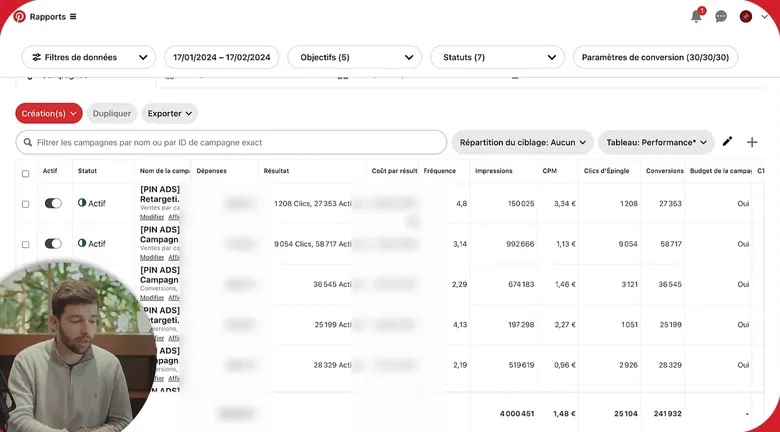
The attribution window is set under “Conversion settings”: here 30 days after click, engagement and view. A one-day reading hides half the orders. - Conversion settings (30/30/30): the report's attribution window
- The Frequency column, added to the table
Check that your campaigns use the Conversions or Catalog sales objective
The symptom. The campaigns run on the Traffic or Awareness objective. They bring in visits, sometimes a lot of them, and get judged on sales they were never designed to produce.
The cause. On Meta, top-of-funnel campaigns make sense because cost is high there. On Pinterest, the cost gap between an awareness campaign and a conversion campaign is small; in February 2026 we were seeing clicks at roughly €0.10 to €0.15, versus about €1 on Google. There is no reason to buy unqualified traffic: you might as well give Pinterest a sales objective from the start.
The fix. Move almost all your campaigns, around 90% on our accounts, to the Conversions objective, and to Catalog sales if you have more than thirty or forty products. If the Conversions objective is not available at creation, the checkout event is not firing yet: go back to the tag before going further.
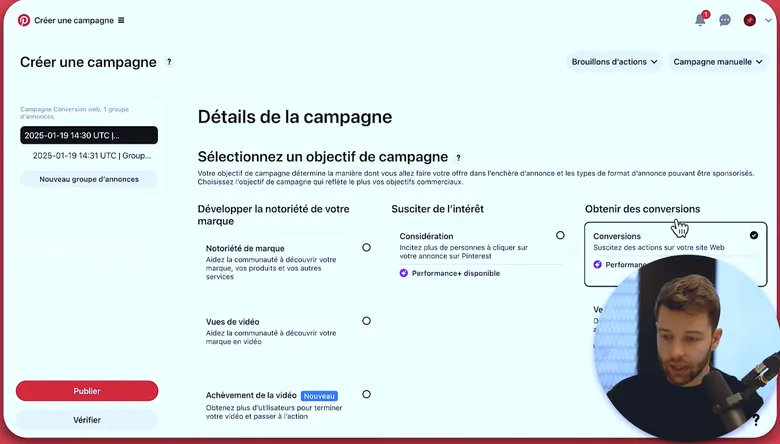
Conversions or Catalog sales, never Consideration or Awareness for an account that wants to sell. If Conversions is greyed out, the purchase event is not firing yet. - Conversions: the objective to keep
- Consideration optimizes for clicks, not sales
Check that your creatives were made for Pinterest, not recycled from Meta
The symptom. One or two visuals per ad group, in square or horizontal format, with an impulse-buy angle and a soundtrack you need in order to understand the message. Click-through rate is low.
The cause. Pinterest is a visual search engine: people come looking for inspiration with purchase intent, not to scroll a feed. Aggressive videos copied from Meta get rejected by the audience; what works is lifestyle creative. Videos start without sound, hence the need for captions. The audience is about 70% women according to the figures we quoted in 2026, which shapes the profiles to feature in UGC creatives.
The fix. Remake your creatives in vertical format, with movement in the first seconds, a call to action at the end and captions. Test several formats: static, carousel, video. We recommend three to six creatives per ad group on standard campaigns, and up to ten or fifteen on Performance+ campaigns, which handle them better.
Check that Performance+ is neither missing nor alone on the account
The symptom. Two opposite cases: either Performance+ has never been tested, or the account contains nothing but Performance+ campaigns, which started fast and then ran out of steam.
The cause. Performance+ is Pinterest's equivalent of Google's Performance Max: an automated campaign whose learning phase is shorter than that of standard campaigns. On the accounts we manage, the observation is clear: standard campaigns help Performance+ campaigns and vice versa. An account running only Performance+ accelerates at the start and lasts less long; yet what you are after on Pinterest is longevity, not a peak followed by a decline.
The fix. Test Performance+ on the Conversions or Catalog sales objective, alongside standard campaigns and not instead of them, with more creatives. The tutorial Performance+: when to enable it details the conditions.
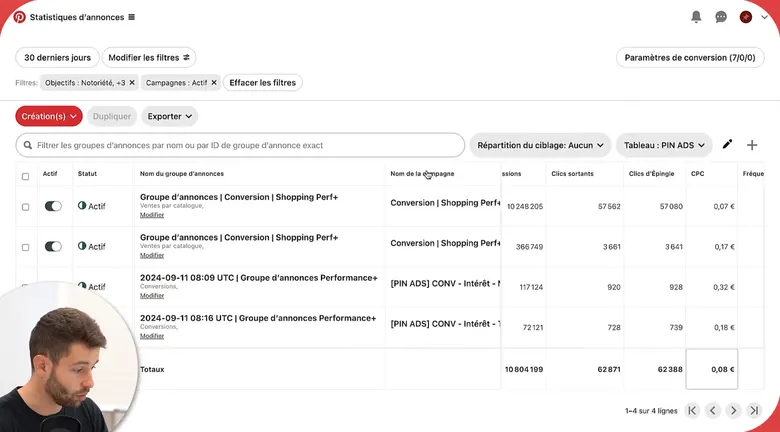
Performance+ and manual campaigns run together: each feeds the other. A 100% Performance+ account starts fast and lasts less long. - Performance+ shopping campaigns
- Manual interest campaigns
Check that your account structure is not a Meta structure
The symptom. Two or three campaigns on campaign budget optimization (CBO), all the creatives in the same campaign, and budget changes as soon as the results move. After each change, sales drop, sometimes to zero.
The cause. On Meta, you put everything in one campaign and the algorithm sorts it out. On Pinterest, the algorithm is very sensitive to budget changes: doubling a daily budget sends the campaign back into the learning phase. On the accounts we manage, the answer is structural: one campaign per keyword group, one per interest, one on Performance+, one per creative angle, one per demographic segment. On an account spending a few hundred euros a day, we have fifteen to twenty active campaigns on average, to spread the risk and keep campaigns from competing with each other.
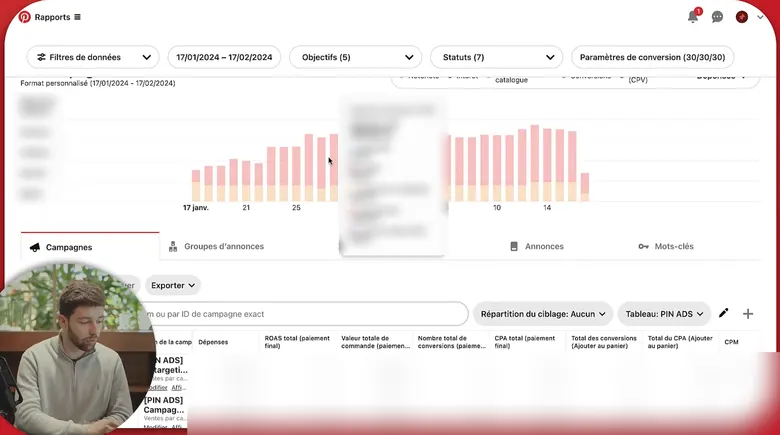
An account we manage with 32 active campaigns, each on one targeting: keywords, interests, catalog, retargeting, Performance+. Amounts are masked. - Daily spend, split by objective
- The Campaigns tab: 32 rows on this account
The fix. Stop touching the budgets of campaigns that are running. To spend more, add campaigns and step up gradually. Scaling on Pinterest is horizontal: you duplicate what works onto other angles or other markets instead of multiplying one campaign's budget.
 Stop making these Pinterest Ads mistakes (June 2025)
Check that interests and keywords are not in the same ad group
The symptom. Keywords have been entered, but spend goes almost entirely to interests. In some accounts, there is no keyword campaign at all.
The cause. An interest such as home decor represents several million people; a keyword such as "sofa" in the same theme, a few hundred thousand searches. If Pinterest has the choice within one ad group, it takes the easy route and delivers to the broad audience. Keywords reach people with intent, who are easier to convert, but they get nothing.
The fix. Separate them: interest campaigns on one side, keyword campaigns on the other. Test both, and check in the reports that spend on keywords is real.
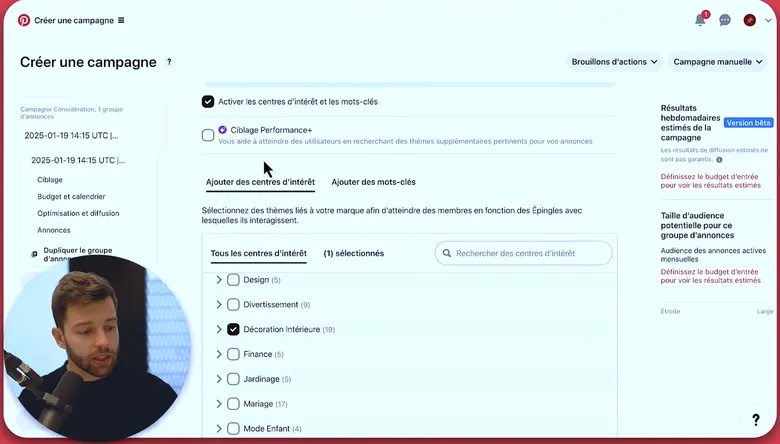
One ad group = one targeting type. Here interests; keywords go in another campaign, otherwise the budget flows to interests. - The Interests tab, used on its own in this group
- The Keywords tab, left empty: they get their own campaign
Check that you have tested several landing pages
The symptom. Every campaign sends to the same product page. Click-through rate is fine, conversions are absent, and the conclusion drawn is that Pinterest does not convert.
The cause. Sometimes the ad is good, the click-through rates too, and it is the page behind it that falls short. Users coming from Pinterest are engaged on the site: they scroll to the bottom of the page and browse several pages. They do not know you yet and need more education than a buyer coming from Meta. Since the traffic is cheap, testing several pages costs a few euros for hundreds of visits.
The fix. Send the same creative to a product page, a collection page and, if you have one, an editorial or advertorial page. Watch on-site behavior with a session-recording tool to spot the section that blocks.


What you should see
- A list of the mistakes that apply to your account, from the most frequent to the least frequent.
- Campaigns on the Conversions or Catalog sales objective, with at least three vertical creatives per ad group.
- Keyword campaigns separated from interest campaigns, and a Performance+ campaign alongside the standard campaigns.
- A test budget spread over at least ten days, which you do not change along the way.
- Two or three landing pages in test for the same creative.
What usually goes wrong
Here are the correction mistakes we see most often on the accounts we manage.
- Fixing everything at once on active campaigns. Every significant change restarts learning. Make the fixes on new campaigns and let the old ones run long enough to compare.
- Doubling the budget of the campaign that works. This is the most frequent Meta reflex: the campaign goes back into learning and sales drop. Add a campaign instead.
- Cutting on day three, even after spreading the budget. The ten-day rule only holds if you keep it to the end.
- Switching the whole account to Performance+. Faster start, shorter lifespan. Keep standard campaigns alongside.
- Adjusting too much, or not at all. Running an account is a rhythm to keep: too many adjustments and performance drops, no adjustments and it drops too. Refreshing creatives and pages is something you schedule.
- Dropping Pinterest retargeting because Meta already does it. People arrive on Pinterest in a different frame of mind and retargeting plays its own role there; setting it up takes thirty minutes to an hour.
- Following the advice to mix interests and keywords. Even when it comes from a Pinterest contact, the outcome is the same: everything goes to interests.
How long should a campaign run before drawing conclusions?
At least ten days, more if the daily budget is small. The learning phase lasts five to ten days on average on our accounts, and zero sales in the first two days is a normal scenario: on the account shown in our June 2025 video, sales started on day three.
Can Pinterest really convert, or is it a traffic channel?
It converts, but the timing depends on the product. A high-priced product needs a longer education phase and retargeting, on Pinterest and elsewhere. In 2023 we were seeing average order values 20 to 30% higher on Pinterest traffic than on Meta.
Do I need a large budget to apply these fixes?
No. On the accounts we manage, starting budgets are modest and step up gradually until the account reaches the plateau where it stabilizes. What matters is not concentrating it on three days and not changing it during learning.
I only have three days of data: what should I look at?
Click-through rate, and nothing else. If it is low, the problem is the creative; if it is fine and sales are not coming in, wait for the end of learning before drawing conclusions.
Let's see whether Pin Ecom fits your store
Twenty minutes on your account, your products and your market. No commitment, and a straight answer, including when the answer is no.
Book a callNo promise of results: that is not how the channel works.