
New Pinterest Ads account: the first ten days
Objective, structure, starting budget and learning phase: how to launch a new Pinterest Ads account without carrying over the reflexes you learned on Meta.
 Luc Bermond
Before this tutorial
This tutorial is for brands that have just opened their Pinterest ads account, or let it sit idle after a first attempt, and want to launch it without carrying over the reflexes they picked up on Meta. It covers launch day (structure, objective, budget) and the ten days that follow: what you look at, what you leave alone, and the decision you make at the end. By the end, you will have an account that has come through its learning phase with readable data, rather than one switched off on day three.
Before you start
- A Pinterest Business account with access to Ads Manager and a payment method on file.
- The Pinterest tag installed, with the "Add to cart" and "Checkout" events firing (see install the Pinterest tag on Shopify).
- Three to five vertical pins per ad group, including at least one video and one still image.
- Your average order value and your break-even point: they decide the starting budget.
Why this step matters
A brand-new ad account has no data. Pinterest does not yet know who buys from you, how long those people stay on your site or which pins they save. It finds out by testing pockets of audience one after another, and that testing takes time: in the video below, published in June 2025, we put the learning phase of a new account at seven to ten days on average. On Meta you get feedback within the day; on Pinterest, it is a question of time before it is a question of budget.
Most of the failed launches we see are not Pinterest failures but transfer errors. In a LinkedIn post of December 17, 2025, we listed the Meta reflexes a brand applies without thinking: cutting a campaign after three days because ROAS is low, reusing its impulse-buy videos, raising the budget sharply as soon as something works, judging performance on a one-day attribution window. The conclusion comes fast: "Pinterest doesn't convert, we're stopping." The account was simply still learning.
What this phase produces when you let it run its course, we describe in a September 2024 video on campaign structure: a 70 to 80% drop in performance during learning, normal at that stage, then a stabilization, then plateaus validated one by one. In a large advertiser's account of its own experience, which we relayed in April 2026, cost per action had fallen 40% between the start and the end of learning. These are observations, not a rule; the conclusion is the same: a three-day read has no value.
 New Pinterest Ads account: what to do and what not to do at launch (June 2025)
Day 0: check that the Conversions objective is available
Open Ads › Conversions: automatic enhanced match turned on, last event dated today. In Event history, compare add-to-carts and checkouts over three days with your back office; the orders of magnitude should line up. Timestamps are in UTC.
If the Conversions objective is greyed out when you create a campaign, Pinterest has not yet seen enough add-to-carts and purchases come through the tag. Our 2022 video on this question advises waiting 48 to 72 hours after the first events, and advises against a traffic campaign "to unlock it", except as a last resort.
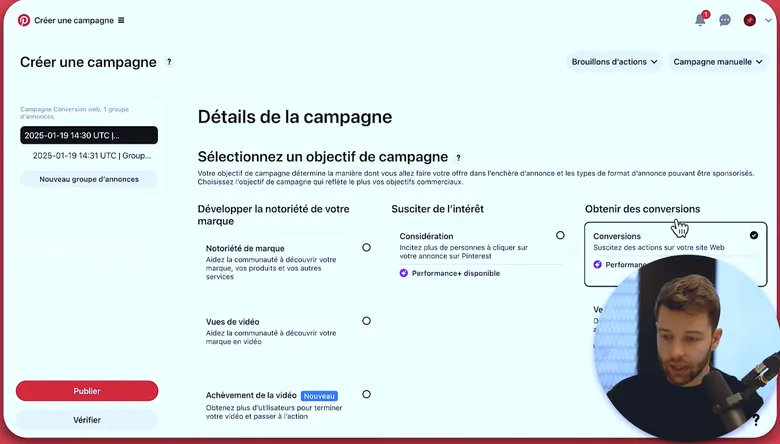
On an account that has already received purchase events, Conversions can be selected. On a new account with no checkout event sent by the tag, the box stays greyed out: wait 48 to 72 hours after the first events. - The Conversions objective, selectable once purchases have come through
- Consideration optimizes for clicks: not for an account that wants to sell
Day 0: choose Conversions, turn off Performance+, optimize for Checkout
Create a manual campaign with the Conversions objective. Not "Awareness" and not "Consideration": those objectives optimize toward impressions or clicks. The June 2025 video points it out: Pinterest account managers often recommend them at the start, promising that conversions will follow. On our accounts, they do not follow: the account learns to find clickers.
Below the objectives, a purple Performance+ banner is checked by default. Uncheck it: Performance+ lets Pinterest choose the audiences, and with no data it scatters the budget. We save it for scaling the budget, once the account already knows its audiences and its creatives; that is the subject of the next tutorial.
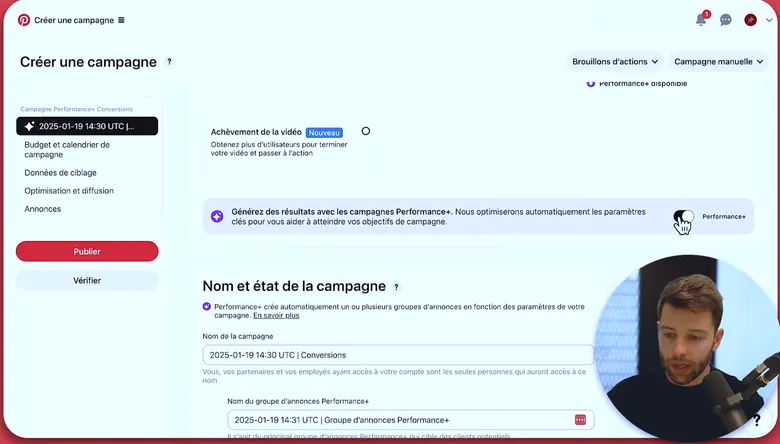
The “Get results with Performance+ campaigns” banner is on by default. On a new account, turn it off: the algorithm has no data yet to choose audiences. - The Performance+ switch, turned off here
- Campaign and ad group names come next
At ad group level, the optimization event is Checkout, not "Add to cart": the purchase is what you want to teach Pinterest.
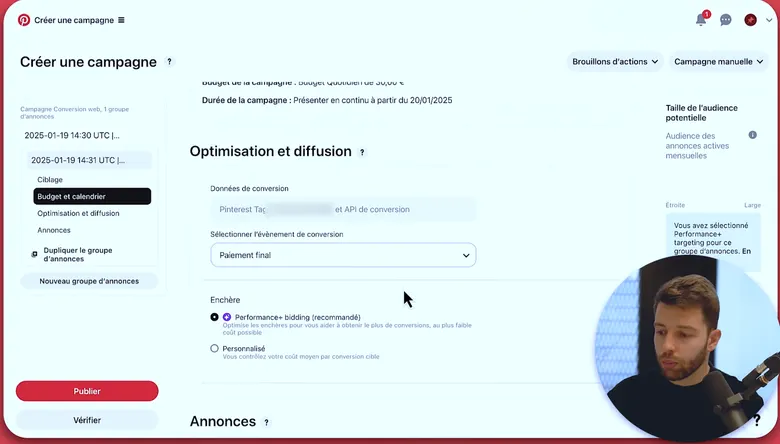
The conversion event is Checkout, not Add to cart. The bid stays on the recommended automatic setting: a custom bid set too low stops Pinterest from spending, and therefore from learning. - The optimization event: Checkout
- The recommended automatic bid, no custom bid at the start
Day 0: one campaign for interests, one for keywords
Do not start on broad targeting with no guidance: on a new account, broad stretches the learning phase, because Pinterest tests pockets of audience that are very far apart. Guide it with top-level interests ("Home decor", for example) and keywords.
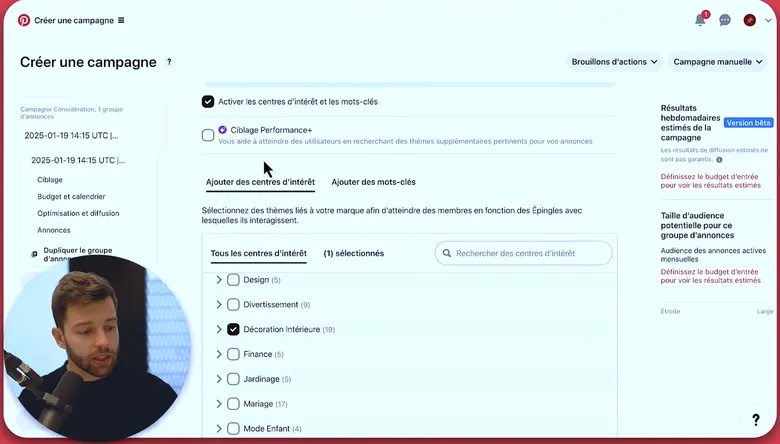
One top-level interest, Performance+ unchecked: you guide the algorithm instead of letting it test unrelated pockets of audience. - Interests and keywords enabled
- Performance+ targeting unchecked
- A top-level interest: Home decor
Keep the two apart: one campaign for interests, another for keywords. Mixed in a single ad group, the budget goes to interests in the vast majority of cases (around 95% in our readings), the larger pockets, and you will never know what the keywords would have done. That is the "interests vs keywords" architecture from our December 2025 post.
For a keyword campaign targeting France, the rule given in our November 2023 video: at least ten keywords and an estimated audience above 100,000. Expanded targeting unchecked, language "French", placements left as they are. Name each campaign so it reads clearly ("Test – interests – product A").
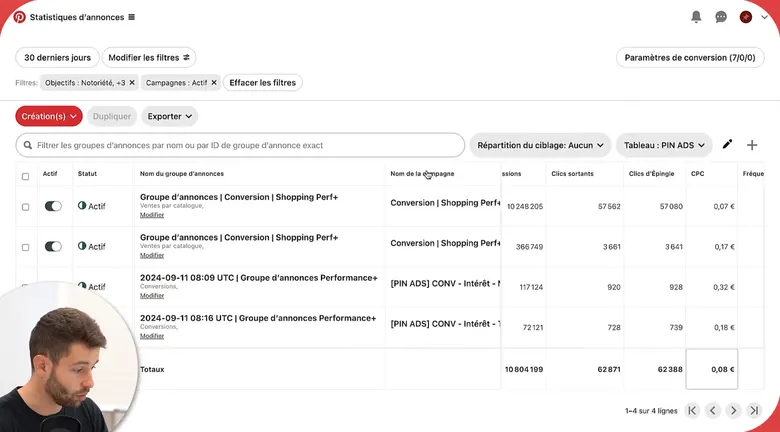
Each campaign name states its objective and targeting: you can read the account structure without opening a single campaign. - Objective then targeting in the name: Conversion, shopping Performance+
- Same convention for the interest campaigns
Day 0: set a daily budget you can hold for ten days, and an automatic bid
The budget is worked out backwards: what you are willing to spend over ten days with no result, divided by ten. Our July 2023 video puts the rule this way: better €10 a day for ten days than €50 a day for three days followed by a cut. The amount depends on the average order value: below an €80 average order value, €5 to €10 per day is enough; around €500, count on €30 to €50 per day, otherwise Pinterest sees add-to-carts but too few purchases to learn from. On the accounts we manage, including the largest, we always start small relative to the overall budget.
Set a fixed daily budget and leave the bid on automatic: a custom bid with a target cost per purchase set too low stops Pinterest from spending, and therefore from learning.
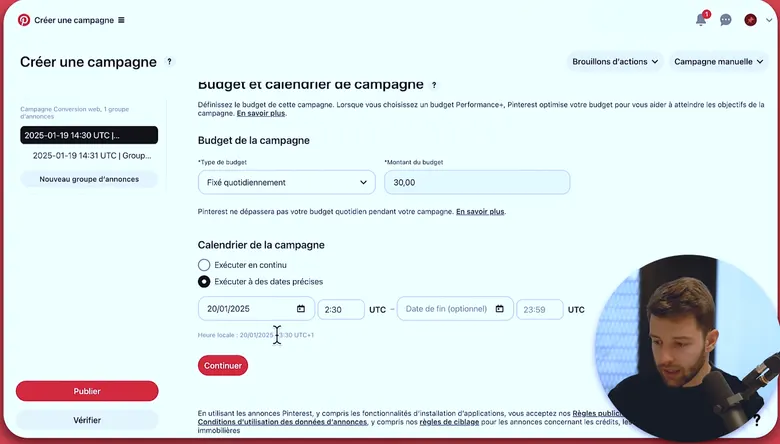
A fixed daily budget and a start scheduled for the next day, early in the night, for a full first day of spend. - Fixed daily budget
- Start scheduled for the next day at 2:30 a.m.
Day 0: load three to five pins per ad group
Select between three and five pins per ad group, four being the usual benchmark; beyond that, performance drops on our accounts. Mix still image and video: on day ten you will know which of the two formats your account prefers. Vertical format (2/3 or 9/16 ratio), no squares. Check each pin in the mobile preview before publishing.
Days 1–3: check delivery, read nothing else
For three days, you look at three things only: ads approved, daily budget spent, tag events still coming in. If any of the three is missing, it is a technical problem to fix right away. Otherwise, close Ads Manager.
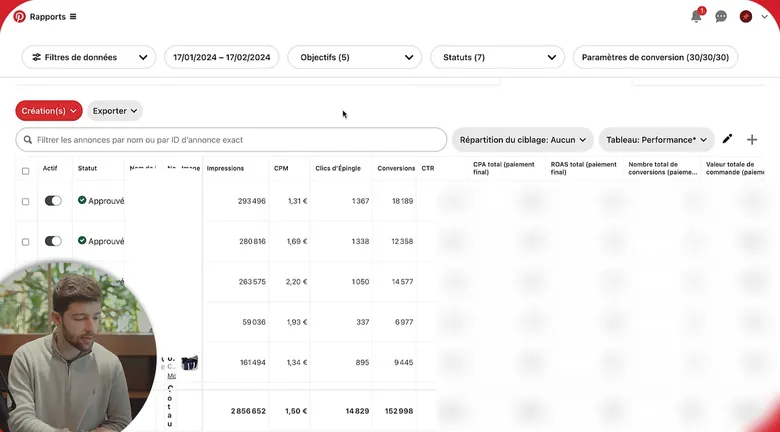
For the first three days, only three columns matter: Approved status, rising impressions, CPM. The rest is masked and, in any case, not readable yet. - Status Approved: the ad is being served
- Impressions: the budget is being spent
- CPM, the only cost worth reading this early
Do not read ROAS. Our November 2023 video advises not opening the results before two or three days. In our December 2025 post, cutting on day three is the first mistake listed, and touching an ad too early is money gone: the spend fed the learning, and editing the campaign resets the counter to zero.
Days 4–7: read the intermediate signals, add retargeting
From day four, you read, still without acting on acquisition. In Ads › Reports, build the simple table we recommend for a first test: spend, impressions, CPM, click-through rate, add-to-carts, checkouts, cost per add-to-cart and cost per purchase.
Go down to ad group level to see where the budget goes: this is where the interests / keywords split pays off, because you see which campaign spends and which one produces add-to-carts. Add the Frequency column: in acquisition, we do not go above 3.
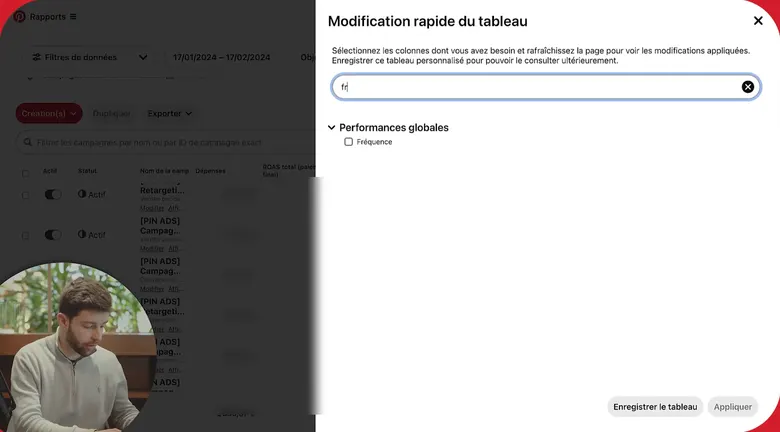
The pencil icon opens the table editor; type “fr”, tick Frequency, apply. The column appears at the end of the table. - The column search
- Frequency, to tick
- Save the table to find it again
Check the attribution window. A one-day window only shows purchases made on the day of the view, whereas many users save the pin and come back later; our July 2023 video shows, on one account, attributed sales more than doubling between a one-day read and a seven-day read. Read on seven days at a minimum.
Around day five, create a retargeting campaign: Conversions objective, ad group on Reconnect with users, site visitors over thirty days and people who engaged with your pins. It is the only campaign added during the ten days.
Days 8–10: prepare the decision without making it
Sort ads by total checkout value rather than click-through rate: in the September 2024 video, we show pins with a lower CTR that generate more sales than the ones that click best. Look at the sales trend over the period rather than a single day; a two-day dip is not a conclusion, and we wait until the weekend has passed before drawing anything from it.
Write down what you will do on day 10, without doing it yet: which campaign spends, which format comes out on top, which pin produced nothing despite normal spend. That last one gets replaced, not simply switched off: the algorithm always needs something left to test.
Day 10: decide, then move up in steps
Three situations come up, as a rule.
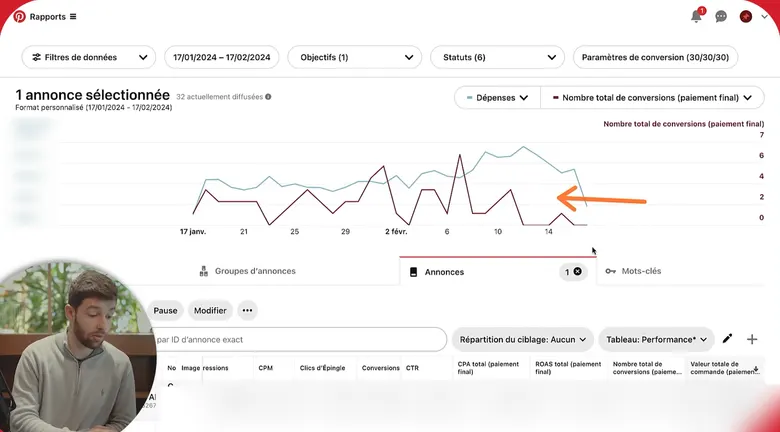
Select the “Total conversions (checkout)” metric rather than impressions: the sales curve is the one that should settle after the first days. - The metric to display: checkout conversions
- The sales curve, the one that matters on day ten
Purchases are coming in and cost per purchase fits within your break-even point. Raise the budget in small steps and let each step settle. We describe this step-by-step climb in the video below and point out that the algorithm handles jolts poorly; the sharp increase is on the list of Meta reflexes to drop.
Clicks and add-to-carts, few or no purchases. The site is not closing the sale, or the read window is too short. Check the seven-day read, let retargeting run, test the landing page (product versus collection) in a separate campaign. Do not cut acquisition.
Almost no spend, or impressions with no clicks. That is a setting, not the market: custom bid too low, keyword audience too narrow, creative that does not fit. Fix one element at a time.
 Pinterest campaign structure and day-to-day management (September 2024)
What you keep are the campaigns that have started learning: we call them always-on campaigns; they run all year with pin and keyword rotations at a measured pace.


What you should see
- Two "Conversions" campaigns, interests and keywords, Performance+ off, automatic bid, optimized for Checkout, untouched for ten days.
- A daily budget that was spent every day, including the first, and a retargeting campaign added around day five.
- A reading table with CPM, click-through rate, add-to-carts, checkouts and frequency, read on seven days.
- A dated decision on day 10, one of three: the next step up, a landing page test, or a setting corrected.
What usually goes wrong
- The campaign is cut on day three. The mistake at the top of our list: the account was learning, the spend is lost and the next one starts from zero.
- The objective is "Consideration" because someone recommended it. Lots of clicks, no purchases.
- Performance+ stayed checked. The budget goes to audiences Pinterest does not know yet; learning takes longer.
- Interests and keywords in the same ad group. The budget goes to interests; the keywords were never tested.
- A custom bid from day one. Target cost too low, Pinterest does not spend, and the conclusion is "it isn't delivering".
How long does the learning phase last on a new Pinterest Ads account?
We put it at seven to ten days on average on a new account (June 2025 video); in 2023, the estimate was five to ten days.
Should you launch with Performance+ to go faster?
No, not on an account with no data: Performance+ relies on what the account already knows about your audiences and your creatives. We turn it on in a second phase, to scale the budget.
The Conversions objective is greyed out, what should I do?
The tag is not yet sending enough add-to-carts and checkouts. Check the event history, fix the tag if needed, wait 48 to 72 hours. Do not launch a traffic campaign to get around it.
Can you relaunch an account that has been idle for several months?
Yes, and this tutorial applies as is: check that the tag is still sending events, start again from the Day 0 structure rather than reactivating the old campaigns, and give it the same ten days.
Let's see whether Pin Ecom fits your store
Twenty minutes on your account, your products and your market. No commitment, and a straight answer, including when the answer is no.
Book a callNo promise of results: that is not how the channel works.