
Pinterest Performance+: when to turn it on, when to skip it
Targeting, bidding, budget, creative: what Performance+ automates on Pinterest Ads, when to enable it based on account history, and what we see on our accounts.
 Luc Bermond
Before this tutorial
This tutorial is for e-commerce brands that already have an active Pinterest Ads account and see the Performance+ checkbox offered every time they create a campaign. You will learn what the option automates, at which point in an account's life to turn it on, how to set it up, and what we observe on the accounts we manage. By the end, you will have a simple decision rule: enable it, wait, or test it alongside your manual campaigns.
Before you start
- A Pinterest Ads account with the tag installed and the "Checkout" event showing up in Ads Manager.
- At least one manual conversion campaign running, with purchases attributed over the past few weeks.
- For catalog sales: a synced product feed, with visuals made for Pinterest and not just packshots.
Why this step matters
Performance+ rolled out to all advertiser accounts in September 2024. It is Pinterest's equivalent of Google's Performance Max, with one difference: it only serves on Pinterest, with no partner site network. In practice, the Performance+ checkbox hands the algorithm four decisions you used to make yourself: targeting (Pinterest expands beyond the keywords and interests you entered), bidding, budget (a Performance+ budget can go up on a good day and come back down on a slow one) and, for catalog campaigns, creative, through Performance+ creative, which generates backgrounds from your feed. The option is available on three objectives: Consideration, Conversions and Catalog sales.
We explain it in the video below: Pinterest built this feature so that more advertisers would launch a first campaign without getting stuck on targeting. It is not the miracle fix many people take it for. What we observe on the accounts we manage comes down to one sentence: Performance+ works with the data that already exists in the account. On a warm account, with campaigns that have been running for months and steady budgets, adding this layer brought CPMs and cost per purchase down, and therefore return on ad spend up. On a brand-new account with no history, performance can take off in the first few days and then fail to hold. And what you are after on Pinterest is stability.
At launch, Pinterest reported roughly 10% lower CPA and CPC compared with a classic setup. In 2026, an advertiser in France published a public write-up of their Performance+ test: a cost per action down 40% between the start and the end of the learning phase, with static formats turning out to be the best performers. These are dated observations, not a promise: they describe accounts that already had data to work with.
One last point, which we have been repeating since 2024: non-Performance+ campaigns feed Performance+ campaigns. The keywords and interests you test by hand enrich the signal the algorithm will use afterwards. So the order matters as much as the settings.
 Should you enable Performance+ in your Pinterest campaigns in 2026?
Check that the account is ready
Before opening Ads Manager, answer three questions. Is the "Checkout" event firing, with purchases attributed over the past thirty days? Do you have at least one manual conversion campaign running, set on the purchase? Does the account have several weeks of delivery history?
If you answer no to any of these, Performance+ is not the priority. We say it plainly in the main video: on a brand-new account, it is not the ideal solution; what you want at the start is to test different keywords, interests and targeting types. Come back here once your manual campaigns have produced purchases.
Create the campaign and choose the objective
In Ads Manager, click Create campaign and choose manual creation. Select the Conversions or Catalog sales objective. Both accept Performance+; so does Consideration, but we concentrate the budget on the bottom of the funnel, where Pinterest's costs per click are most favorable.
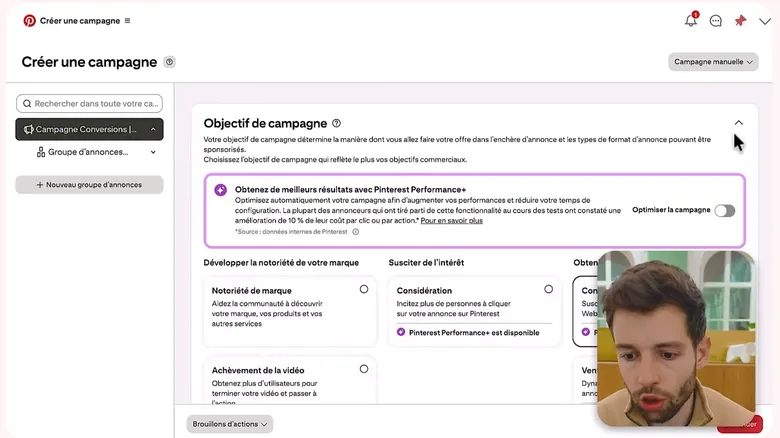
In manual creation, the “Optimize the campaign” switch stays off. Each compatible objective shows “Pinterest Performance+ is available”: Consideration, Conversions, Catalog sales. - The Performance+ switch, off here: the campaign stays manual
- The “Pinterest Performance+ is available” label under the objective
On the accounts we manage, catalog sales with Performance+ is what responded best. That observation goes back to October 2024, on one condition: a product feed with inspirational images, in Pinterest's universe, rather than packshots. If you have more than twenty products, this is the campaign to test first.
 Pinterest Performance+: first feedback after two months of testing
Check the Performance+ box and read what changes
Under the objective, a Performance+ checkbox appears. Check it. From there, Ads Manager simplifies the ad group: targeting switches to automated mode, and so does bidding. You can still enter keywords or interests, but Pinterest treats them as hints, not as limits.
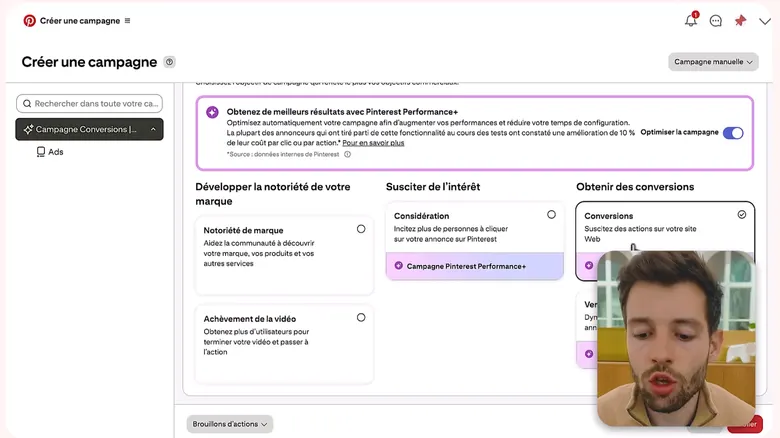
Once the switch is on, every objective carries the purple “Pinterest Performance+ campaign” label and Ads Manager trims the settings that follow. - The “Optimize the campaign” switch turned on
- The “Pinterest Performance+ campaign” label on the objective
Make sure the "Performance+ targeting" label appears in the ad group summary before moving on: that is the point we check on screen in the main video.
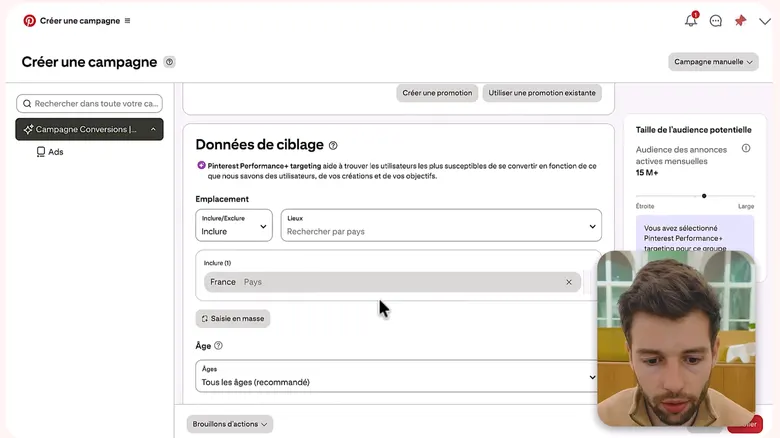
Targeting shrinks to country and age; the box on the right confirms “Pinterest Performance+ targeting”. No interests or keywords to enter: the algorithm chooses. - The confirmation box: Pinterest Performance+ targeting
- The country stays in your hands
- Age: all ages, the recommended setting
Optimize for Checkout, not for Add to cart
This is the setting we call "super important" in the main video. For the conversion event to optimize for, choose Checkout (the final purchase). Not "Add to cart", not "Checkout initiated". With automated targeting, the algorithm looks for the profiles most likely to trigger the event you give it: give it the cart, and it will bring you carts.
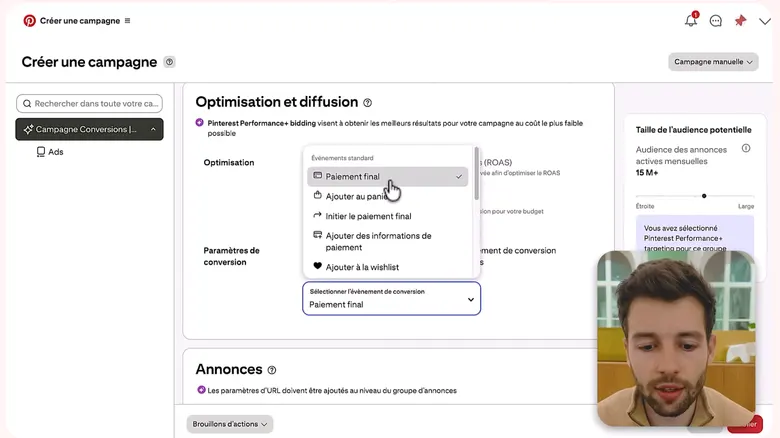
The standard events menu: Checkout is ticked. Add to cart gives a flattering cost per conversion but no sales. - Checkout, the event to keep
- Add to cart: avoid it as the optimization event
On the accounts we manage, a Performance+ campaign set on Add to cart shows an attractive cost per event and a cost per purchase that is not.
Set the budget and let it breathe
Set a daily budget you can hold for several weeks without touching it. If you enable Performance+ budget, Pinterest can raise that amount on a good day and lower it on another. That is useful on a warm account; on an account that has only just passed the readiness check, keep the budget fixed at first so you can read the results without an extra variable.
Either way, do not change this budget during the learning phase. We showed it on an account in September 2024: campaign launched on the 3rd, first conversions on the 9th, performance built over about ten days. Pinterest's algorithm is slower than Meta's; every significant budget change sends it back into learning.
Keep the manual campaigns running alongside
Performance+ does not replace your structure; it adds to it. It is advisable to test with and without, in parallel, because manual campaigns feed the automated ones. Keep:
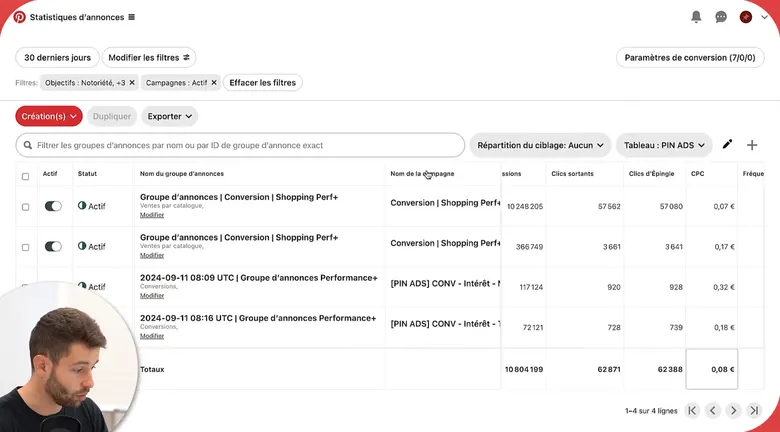
On the same account, the Performance+ (shopping) campaigns run next to the manual interest campaigns. Each name states its targeting. - The Performance+ shopping campaigns
- The manual interest campaigns, kept alongside
- one interest campaign, with interests broad enough to exceed one million in potential audience on the French-speaking market;
- one keyword campaign, with terms broad enough (above one hundred thousand in audience) for Pinterest to explore the variations itself;
- one classic catalog campaign if you already have a Performance+ catalog campaign, for comparison;
- your retargeting campaigns, on a logic of roughly 80% of budget in acquisition and 20% in retargeting.
On Pinterest, you do not put all your creative into one broad campaign the way you would on Meta: you need granularity. We show it in the video on the settings that ruin campaigns: mixing interests and keywords in the same ad group sends the whole budget toward the broadest audience. Performance+ does not fix that mistake, it hides it.
On the creative side, what we see matches the public write-up cited above: static, lifestyle formats hold up well under Performance+. Put at least four pieces of creative per ad group and keep control of their rotation.
Read the results after learning
Wait for the end of the learning phase, about ten days at a minimum, before comparing. Open the campaign view over the past thirty days and put side by side, for the Performance+ campaign and your manual campaigns with the same objective: CPM, cost per outbound click, cost per purchase and return on ad spend.
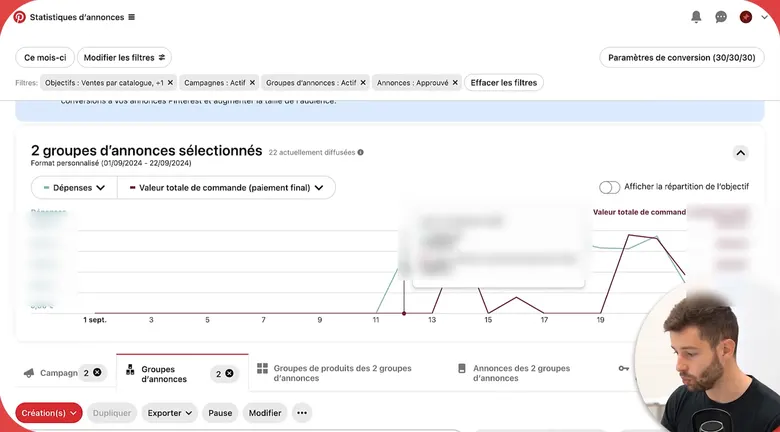
Two ad groups compared over a month: what matters is whether the curve holds, not a spike. Amounts are masked. - Two ad groups selected, compared over the same period
- The two metrics shown: spend and order value
What you are looking for is not a spike, it is a curve that holds. One point we insist on: a Performance+ campaign launched too early can post very good days and then deteriorate. Read cost per purchase week after week, not just the cumulative total. On a warm account, falling CPMs are the first sign that the layer is working, even before return on ad spend.
Decide: keep, cut, or wait
Three situations, three decisions.
The Performance+ campaign holds a cost per purchase at or below your best manual campaigns, over several weeks: keep it as your always-on campaign and duplicate it toward other audience pockets or other creative.
It started well and then deteriorated, while the manual campaigns stayed stable: the account lacked data. Cut it without changing anything else, let the manual campaigns accumulate purchases for a few weeks, then launch a new Performance+ campaign.
It never took off: check the optimization event (step 4) and the product feed before drawing conclusions about the option itself. On the accounts we manage, most cases of "Performance+ doesn't work" come down to one of those two causes.


What you should see
- A Performance+ campaign created separately, set on the "Checkout" event, with a budget held unchanged during learning.
- Your manual campaigns (interests, keywords, catalog, retargeting) still active alongside, unchanged.
- After about ten days, a CPM, cost per purchase and return on ad spend comparison between the Performance+ campaign and the manual ones, over the same period.
- A dated decision: always-on, pause, or relaunch later.
What usually goes wrong
- Performance+ enabled on the account's very first campaign. This is the most common case, because the option is offered by default. Without history, the algorithm has nothing to work with; performance sometimes takes off, then drops back.
- Every campaign switched to Performance+ at the same time. No manual campaign is left to feed the signal, and no reference point is left to judge by.
- The optimization event left on "Add to cart". Cost per event looks good, cost per purchase does not follow.
- The budget edited every other day. Every significant change restarts learning, and on Pinterest learning takes longer than elsewhere.
- A catalog feed made of packshots on a white background. Performance+ creative generates backgrounds, it does not redo the visual.
- A verdict after three days. First conversions often arrive after a week; the curve is read over a month.
Does Performance+ replace keyword campaigns?
No. On the accounts we manage, keywords remain one of the targeting types that work best, because Pinterest is a visual search engine. We recommend keeping manual campaigns running in parallel: they feed the Performance+ campaigns and serve as the reference for judging them.
Should I enable Performance+ budget on top of targeting?
On a warm account, yes, it is consistent: Pinterest adjusts the daily budget according to the day. On an account that has only just passed the readiness check, keep a fixed budget at first: you will get a cleaner read of the results.
What exactly does Performance+ creative do?
For catalog campaigns, Pinterest generates custom backgrounds from your product feed, with human review on Pinterest's side. Pinterest has reported higher click-through rates on these visuals; that does not excuse you from starting with an inspirational feed.
How long before judging a Performance+ campaign?
About ten days for the first signals, a month for a decision. What you are looking for is a stable cost per purchase week after week, not one good day.
What about actalike audiences?
Actalike audiences start from a list you provide, customers or buyers identified by the tag; they stand out well in 2026 on our accounts. Test them in a dedicated campaign, next to the Performance+ campaign, not inside it.
Let's see whether Pin Ecom fits your store
Twenty minutes on your account, your products and your market. No commitment, and a straight answer, including when the answer is no.
Book a callNo promise of results: that is not how the channel works.